
@api
被 @api 标记后, 会解析成 api 文档
@api {method} path [title]| Name | Description |
|---|---|
| method | Request method name: DELETE, GET, POST, PUT, … More info Wikipedia HTTP-Request_methods |
| path | Request Path. |
| titleoptional | A short title. (used for navigation and article header) |
Example:
/**
 * @api {get} /user/:id 获取用户详情
 */
@apiDefine
用来定义全局描述, 比如服务器内部错误描述, 权限描述等
@apiDefine name [title] [description]| Name | Description |
|---|---|
| name | Unique name for the block / value. Same name with different @apiVersion can be defined. |
| titleoptional | A short title. Only used for named functions like @apiPermission or @apiParam (name). |
| descriptionoptional | Detailed Description start at the next line, multiple lines can be used. Only used for named functions like @apiPermission. |
Example:
/**
 * @apiDefine MyError
 * @apiError UserNotFound The <code>id</code> of the User was not found.
 */

/**
 * @api {get} /user/:id
 * [下面引入全局定义]
 * @apiUse MyError
 */
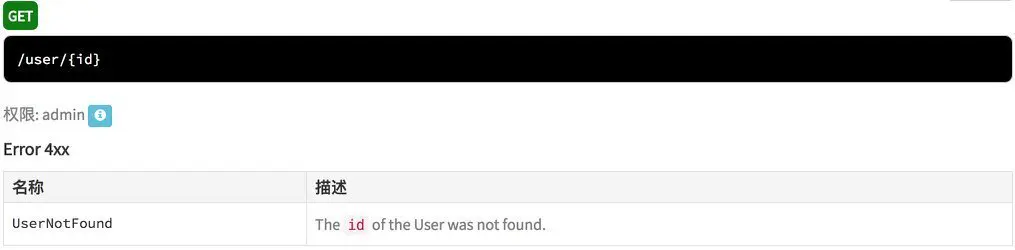
/**
* @apiDefine admin User access only
* This optional description belong to to the group admin.
*/
/**
* @api {get} /user/:id
* [下面引入全局定义]
* @apiPermission admin
*/
@apiDescription
用于定义接口描述信息
@apiDescription text| Name | Description |
|---|---|
| text | Multiline description text. |
Example:
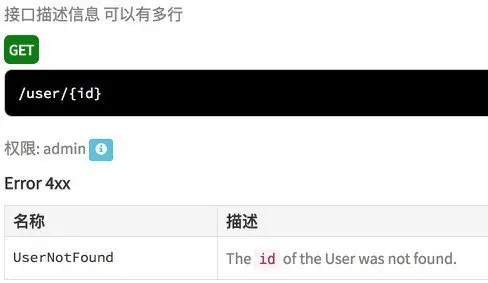
/**
 * @api {get} /user/{id} 获取用户详情
 * @apiDescription 接口描述信息
 * 可以有多行
 * @apiUse MyError
 * @apiPermission admin
 */
@apiError
定义错误的描述信息
@apiError [(group)] [{type}] field [description]| Name | Description |
|---|---|
| (group)optional | All parameters will be grouped by this name. Without a group, the default Error 4xx is set. |
| {type}optional | Return type, e.g. {Boolean}, {Number}, {String},{Object}, {String[]} (array of strings), … |
| field | Return Identifier (returned error code). |
| descriptionoptional | Description of the field. |
@apiErrorExample
错误信息示例
@apiErrorExample [{type}] [title] example| Name | Description |
|---|---|
| typeoptional | Response format. |
| titleoptional | Short title for the example. |
| example | Detailed example, multilines capable. |
Example:
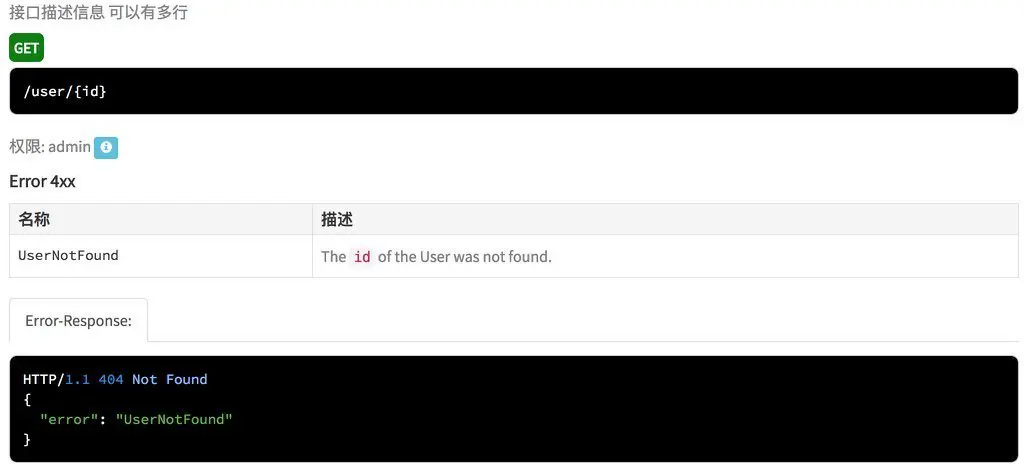
/**
 * @api {get} /user/{id} 获取用户详情
 * @apiDescription 接口描述信息
 * 可以有多行
 * @apiUse MyError
 * @apiPermission admin
 * @apiErrorExample {json} Error-Response:
 *     HTTP/1.1 404 Not Found
 *     {
 *       "error": "UserNotFound"
 *     }
 */
@apiExample
api 请求示例
@apiExample [{type}] title
example| Name | Description |
|---|---|
| typeoptional | Code language. |
| title | Short title for the example. |
| example | Detailed example, multilines capable. |
Example:
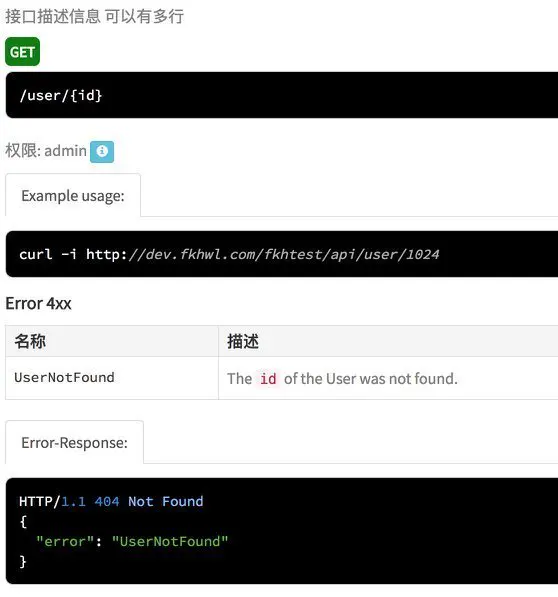
/**
 * @api {get} /user/{id} 获取用户详情
 * @apiDescription 接口描述信息
 * 可以有多行
 * @apiUse MyError
 * @apiPermission admin
 * @apiErrorExample {json} Error-Response:
 *     HTTP/1.1 404 Not Found
 *     {
 *       "error": "UserNotFound"
 *     }
 * @apiExample {curl} Example usage:
 *     curl -i http://dev.yyyyy.com/test/api/user/1024
 */
@apiGroup
定义方法文档块属于哪个组。组将用于生成输出中的主导航。结构定义不需要 @apigroup
@apiGroup name| Name | Description |
|---|---|
| name | Name of the group. Also used as navigation title. |
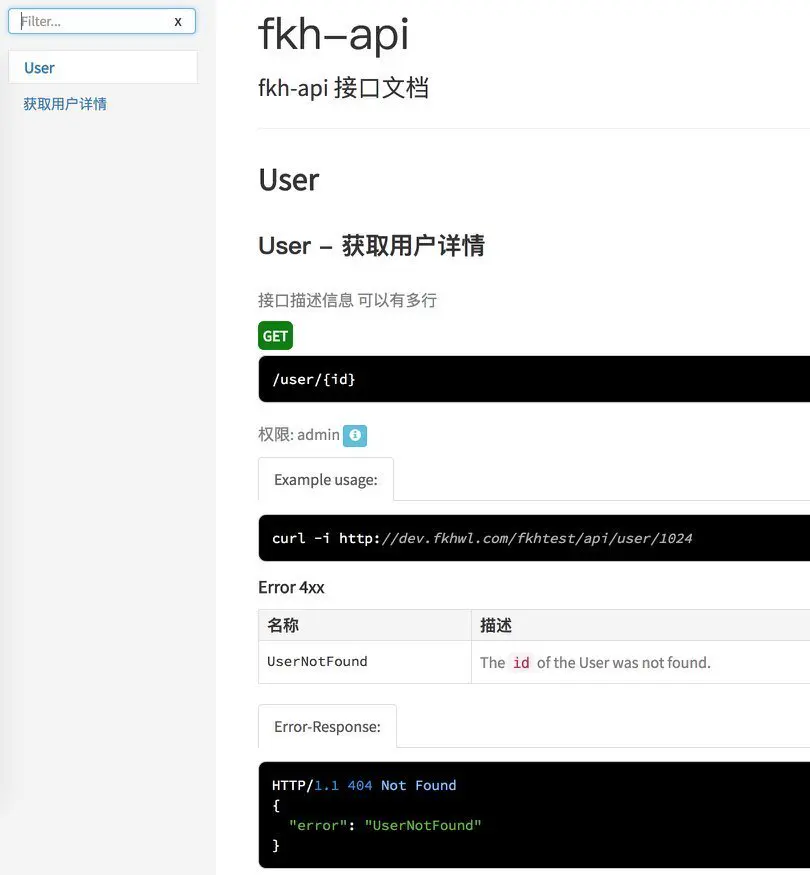
Example:
/**
 * @api {get} /user/{id} 获取用户详情
 * @apiDescription 接口描述信息
 * 可以有多行
 * @apiGroup User
 * @apiUse MyError
 * @apiPermission admin
 * @apiErrorExample {json} Error-Response:
 *     HTTP/1.1 404 Not Found
 *     {
 *       "error": "UserNotFound"
 *     }
 * @apiExample {curl} Example usage:
 *     curl -i http://dev.yyyyy.com/test/api/user/1024
 */
@apiHeader
描述传递给 API 头部的参数,例如用于授权。
@apiHeader [(group)] [{type}] [field=defaultValue] [description]Usage: @apiHeader (MyHeaderGroup) {String} authorization Authorization value.
| Name | Description |
|---|---|
| (group)optional | All parameters will be grouped by this name. Without a group, the default Parameter is set. |
| You can set a title and description with @apiDefine. | |
| {type}optional | Parameter type, e.g. {Boolean}, {Number}, {String},{Object}, {String[]} (array of strings), … |
| field | Variablename. |
| [field] | Fieldname with brackets define the Variable as optional. |
| =defaultValueoptional | The parameters default value. |
| descriptionoptional | Description of the field. |
Examples:
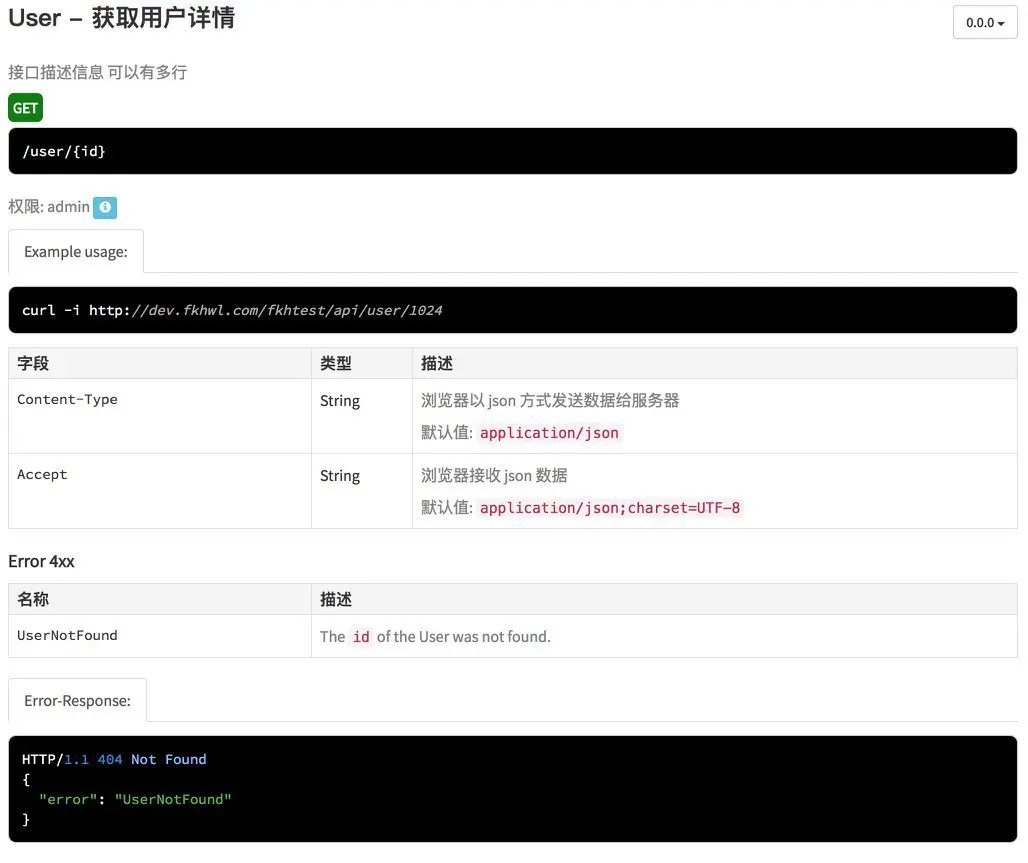
/**
 * @api {get} /user/:id
 * @apiHeader {String} Content-Type=application/json 浏览器以 json 方式发送数据给服务器
 * @apiHeader {String} Accept=application/json;charset=UTF-8 浏览器接收 json 数据
 */
使用 @apiDefine 定义全局 header 描述
/**
 * @apiDefine Header
 * @apiHeader {String} Content-Type=application/json 浏览器以 json 方式发送数据给服务器
 * @apiHeader {String} Accept=application/json;charset=UTF-8 浏览器接收 json 数据
 */
引入 header 描述
/**
 * @api {get} /user/{id} 获取用户详情
 * @apiDescription 接口描述信息
 * 可以有多行
 * @apiGroup User
 * @apiUse MyError
 * @apiPermission admin
 * @apiUse Header
 * @apiErrorExample {json} Error-Response:
 *     HTTP/1.1 404 Not Found
 *     {
 *       "error": "UserNotFound"
 *     }
 * @apiExample {curl} Example usage:
 *     curl -i http://dev.yyyyy.com/test/api/user/1024
 */
@apiHeaderExample
header 参数 示例
@apiHeaderExample [{type}] [title]
example| Name | Description |
|---|---|
| typeoptional | Request format. |
| titleoptional | Short title for the example. |
| example | Detailed example, multilines capable. |
Example:
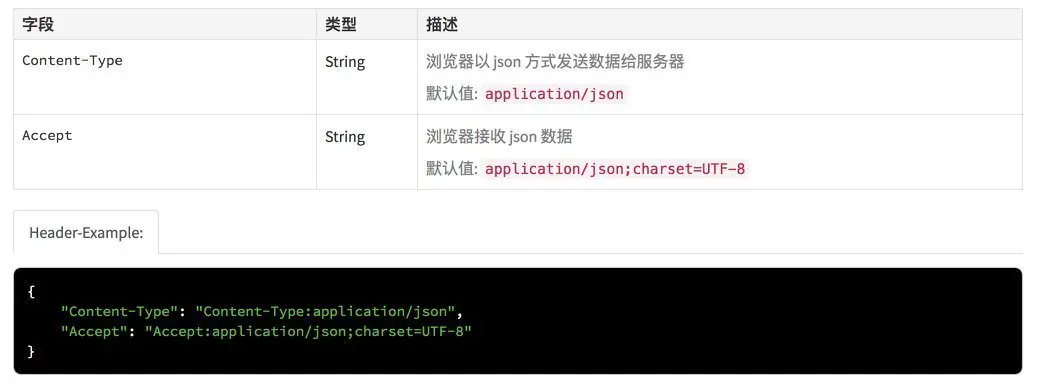
/**
 * @apiDefine Header
 * @apiHeader {String} Content-Type=application/json 浏览器以 json 方式发送数据给服务器
 * @apiHeader {String} Accept=application/json;charset=UTF-8 浏览器接收 json 数据
 * @apiHeaderExample {json} Header-Example:
 *     {
 *       "Content-Type": "Content-Type:application/json",
 *       "Accept": "Accept:application/json;charset=UTF-8"
 *     }
 */
@apiIgnore
用于定义未完成的接口描述, 不会被显示出来 必须在 @api 之前定义
@apiIgnore [hint]Usage: @apiIgnore Not finished Method
| Name | Description |
|---|---|
| hintoptional | Short information why this block should be ignored. |
Example:
/**
 * @apiIgnore Not finished Method
 * @api {get} /user/:id
 */
@apiName
定义方法文档块的名称。将在生成的输出中使用子导航名。结构定义不需要 @apiName。
@apiName name| Name | Description |
|---|---|
| name | Unique name of the method. Same name with different @apiVersion can be defined. Format: method + path (e.g. Get + User), only a proposal, you can name as you want. |
Example:
/**
 * @api {get} /user/:id
 * @apiName GetUser
 */
@apiParam
描述传递给 API 方法的参数
Usage: @apiParam (MyGroup) {Number} id Users unique ID.
| Name | Description |
|---|---|
| (group)optional | 可定义一个 group ,用于抽象出公共的参数 ()表示可以不用定义 group |
| {type}optional | 参数类型 |
| {type{size}}optional | 参数长度 {string{..5}} {string{2..5}} {number{100-999}} |
| {type=allowedValues}optional | 参数允许的值 {string="small"} {string {..5}="small","huge"} {number=1,2,3,99} |
| field | 字段名称 |
| [field=defaultValueoptional] | 参数默认值 (有一个默认标识) [] 标识有一个可选标识 |
| descriptionoptional | 字段描述 |
Examples:
/**
 * @api {get} /user/:id
 * @apiParam {Number} id Users unique ID.
 */

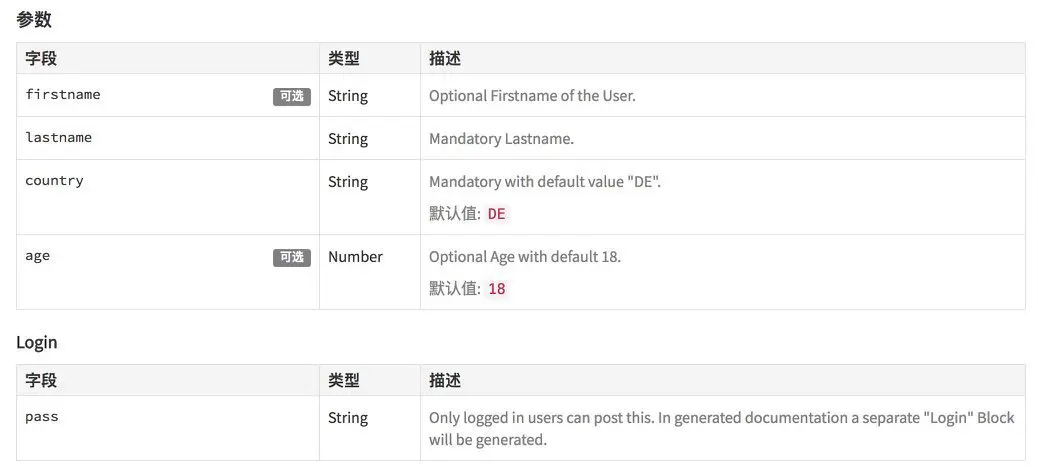
/**
 * @api {post} /user/
 * @apiParam {String} [firstname]  Optional Firstname of the User.
 * @apiParam {String} lastname     Mandatory Lastname.
 * @apiParam {String} country="DE" Mandatory with default value "DE".
 * @apiParam {Number} [age=18]     Optional Age with default 18.
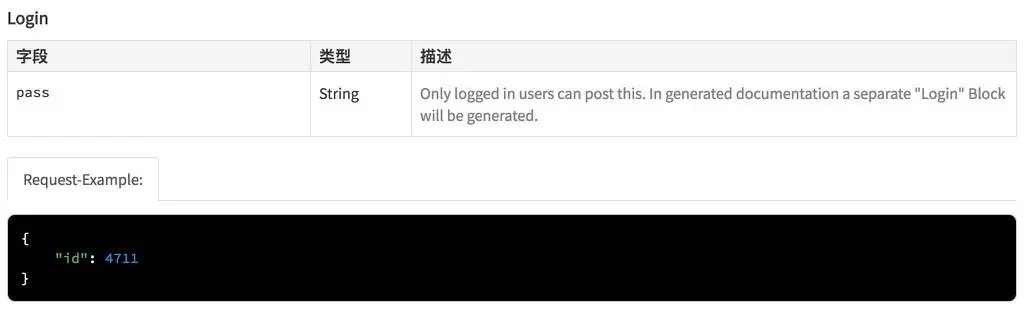
 *
 * @apiParam (Login) {String} pass Only logged in users can post this.
 *                                 In generated documentation a separate
 *                                 "Login" Block will be generated.
 */
@apiParamExample
请求参数示例
@apiParamExample [{type}] [title]
example| Name | Description |
|---|---|
| typeoptional | Request format. |
| titleoptional | Short title for the example. |
| example | Detailed example, multilines capable. |
Example:
/**
 * @api {get} /user/:id
 * @apiParamExample {json} Request-Example:
 *     {
 *       "id": 4711
 *     }
 */
@apiPermission
定义接口权限
@apiPermission name| Name | Description |
|---|---|
| name | Unique name of the permission. |
Example:
/**
 * @api {get} /user/:id
 * @apiPermission none
 */
@apiPrivate
将 API 定义为私有的,允许创建两个 API 规范文档:一个不包含私有 api,另一个包含它们。
@apiPrivateUsage: @apiPrivate
Command line usage to exclude/include private APIs: --private false|true
Example:
/**
 * @api {get} /user/:id
 * @apiPrivate
 */
默认不显示私有接口
如果需要包含私有接口 使用一下命令
apidoc -i . -o apidoc/ --private true@apiSampleRequest
定义是否显示接口调用相关部分 在与 apidoc.json 配置参数 [ sampleurl ]结合使用此参数
- 如果在
apidoc.json定义了sampleUrl, 全部的 api 都会有一个测试表单 - 如果没有定义
sampleUrl字段, 只有标识了@apiSampleRequest的接口才会有测试表单 - 如果定义了
sampleUrl字段, api 中也有@apiSampleRequest url, 且 url 已 http 开头, 则 api 的 url 会覆盖全局的sampleUrl - 如果定义了
sampleUrl字段, 但是某个 api 不需要测试表单, 则可以使用@apiSampleRequest off
@apiSampleRequest url定义 package.json
{
  "name": "xxx-api",
  "version": "1.0.0",
  "description": "xxx-api 接口文档",
  "apidoc": {
    "title": "",
    "url" : "",
    "sampleUrl":"http://dev.yyyyy.com/test/api"
  }
}
所有 api 都会出现 测试表单
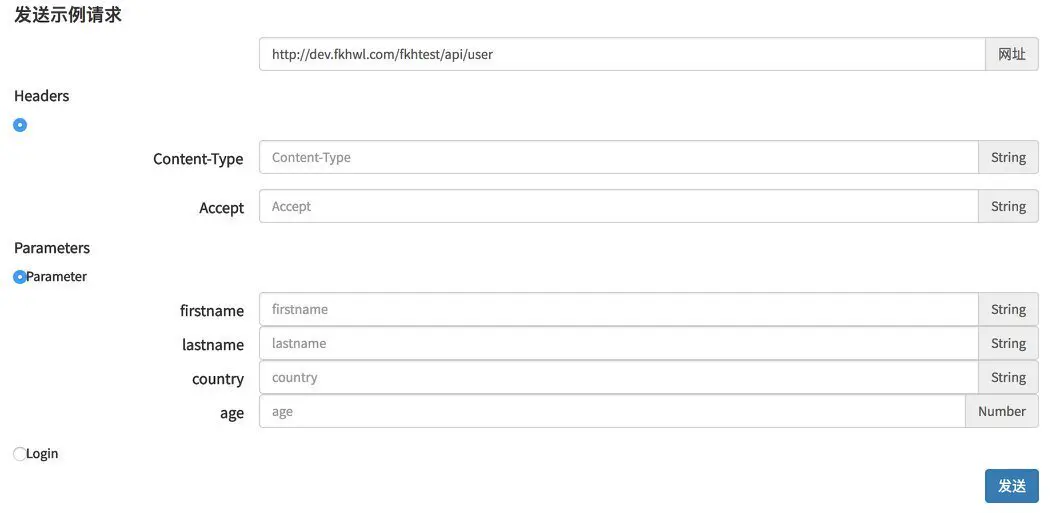
同时定义测试 url, 且 @apiSampleRequest 已 http 开头, 则会覆盖 sampleUrl
@apiSampleRequest http://127.0.0.1/test/api/user
如果 @apiSampleRequest 只是定义 URI, 则会组合 apiSampleRequest 和 sampleUrl, 生成最终的 测试地址
@apiSampleRequest /user
@apiSuccessExample
定义正确的返回结果
@apiSuccessExample [{type}] [title]
example| Name | Description |
|---|---|
| typeoptional | Response format. |
| titleoptional | Short title for the example. |
| example | Detailed example, multilines capable. |
Example:
/**
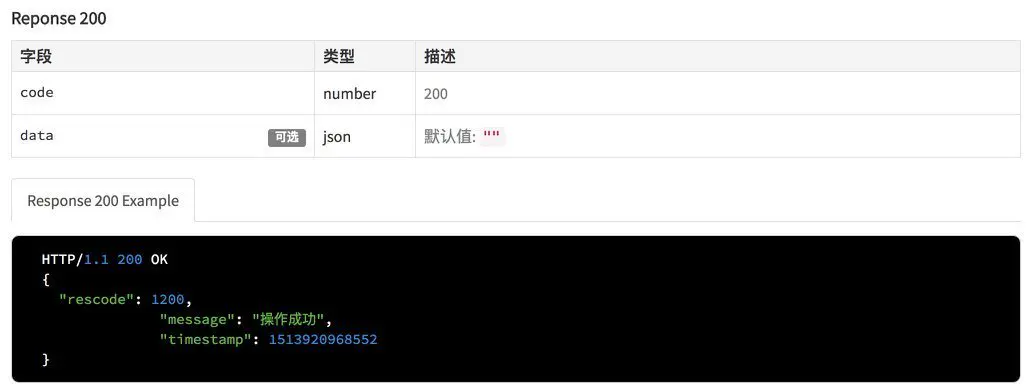
 * @apiDefine CODE_200 调用成功
 * @apiSuccess (Reponse 200) {number} code 200
 * @apiSuccess (Reponse 200) {json} [data='""']
 * @apiSuccessExample {json} Response 200 Example
 *   HTTP/1.1 200 OK
 *   {
 *     "rescode": 1200,
 * 		"message": "操作成功",
 * 		"timestamp": 1513920968552
 *   }
 */
@apiUse
定义 使用 @apiDefine 定义的全局定义
@apiUse nameUsage: @apiUse MySuccess
| Name | Description |
|---|---|
| name | Name of the defined block. |
Example:
/**
 * @apiDefine MySuccess
 * @apiSuccess {string} firstname The users firstname.
 * @apiSuccess {number} age The users age.
 */

/**
 * @api {get} /user/:id
 * @apiUse MySuccess
 */
@apiVersion
定义 api 版本, 可用于对比不同的版本变化
@apiVersion versionUsage: @apiVersion 1.6.2
| Name | Description |
|---|---|
| version | Simple versioning supported (major.minor.patch). More info on Semantic Versioning Specification (SemVer). |
Example:
/**
 * @api {get} /user/{id}
 * @apiVersion 1.6.2
 */
历史版本需要拷贝的 -apidoc.js 文件中